
Original on this deviceSelected MOU excerpt
Smart Legal Document Auto-Redaction for AI.
Use all the same AI models you love, with privacy protection built in to every chat.
For attorneys, judges, paralegals, legal assistants, law clerks, law students, legal researchers, mediators & arbitration officers
Client privacy.Part of the conversation.
A focused, web-based workroom for legal professionals. Work with specialist Legal Skilled AI agents while DOCsafe replaces detected personal details before they reach the AI. Keep a reviewable record of what was protected.
Designed for tablets, laptops and desktops - not a phone app.The full TeamLaw BYOK CORE account includes CaptuGo for mobile capture and many other features.
Platform fee waived for 7 days after card setup · Then US$80/month from day 8 · OpenRouter usage billed separately
DOCsafe
You get automatic protection plus a detailed audit trail of safe compliant AI use.
ZDR policy & on-demand agents
Zero Data Retention.
Agents on demand.
An AI agent is called when you send a query. It works on that request rather than running continuously in the background.
No provider storage. No model training.
Under Zero Data Retention (ZDR), qualifying providers do not keep a stored record of your prompts and replies or use them to train their AI models.
We automatically filter the available models to those with an OpenRouter-listed Zero Data Retention provider.
Turn on ZDR in your OpenRouter privacy settings so requests use those providers. OpenRouter’s policy and exceptions still apply.
Local browser protection
Redaction & unredaction.
Inside your browser.
Your browser hides detected personal details before the text is sent to AI, then puts those details back into the reply you read.
That replacement happens on your device, in your web browser - not on our servers.
-
Your browser protects the text.
Detected details, such as a client’s name or contact information, are replaced with anonymous labels before the question or document text reaches AI.
-
AI works with the protected version.
The AI sees the labels - not the original details hidden behind them - and uses the surrounding semantic context to answer your question.
-
Your browser restores the reply.
When the answer comes back, your browser swaps the labels back to the original details for you. You read a normal reply without having to decode it yourself.
Multi-Lingual AI
Legal work doesn't stop at English.
For non-English contracts, Fast and Deep each use selected models trained for language work. Draft contract language, review clauses and translate text without leaving the discussion.
Available in both BYOK CORE and BYOK DOCsafe.
Fast
A quicker pass for drafting, wording and translation.
Deep
More time for careful clause review and nuanced contract language.
A closer look at DOCsafe
Real Document Auto-Redaction
Watch this example as we replace personally identifiable information (PII) with tokens. Redact and unredact on every AI query and reply - automatically. And optionally check it yourself before you send.
Tokenized text sent to AIExample transformation
View the entire original and the redacted version together
Original on this device · full source
Tokenized text sent to AI · full document
Example reply · restored in your view
Complete redaction record for this illustrated MOU
Every mapping used in the full-document example, including references not repeated in the reply. The 14 captured protected-reference mappings are retained; eight additional contact and identifier tokens are marked as illustrative.
| Type | Original | Token |
|---|
Optional Human Review
Review before send. You stay in control.
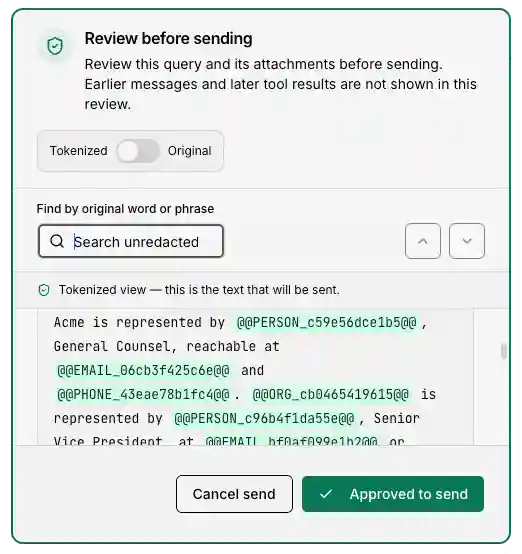
With review before send enabled, DOCsafe pauses after tokenizing your query and attachments so you can inspect what will be sent to the agent. Switch between protected and original text, select any missed word or phrase and choose “Redact this”. Then choose “Cancel send” or “Approved to send”.
Catch missed details before sending, and make the final decision yourself. Viewing the original does not change the protected text that will be sent.
Automatic detection can miss sensitive details or identifying context. This review covers the content shown at that stage, not earlier messages or later tool results.
Less exposure. More control.
Keep detected personal details out of AI requests. Choose the categories DOCsafe checks and control redaction for each discussion.
Agents work when you do.
AI agents are created on demand, one turn at a time. Get help with the task at hand, with no continuously running agent in the background.
A record you can review.
A redaction audit trail stays with each discussion. Inspect protected-reference mappings and revisit what was replaced.
A small plan. A capable workroom.
The essentials for everyday legal AI work.
9 built-in legal specialistsCreate up to 100 custom agentsUnlimited SkillsDOCsafe automatic redactionLive web search*Export discussions · PDF, RTF & Markdown
*Live web search requires redaction to be off. Review sensitive content before searching.
Choose the right workroom
Two plans. One shared commitment to AI privacy & security.
DOCsafe redaction is included in both plans. BYOK DOCsafe is the focused discussion edition; BYOK CORE adds the broader legal workspace.
On a small screen, scroll the table horizontally to compare both plans.
- Included
- Not included
- Limited or conditional
| Feature | TeamLaw BYOK CORE | TeamLaw BYOK DOCsafe |
|---|---|---|
| Main purpose | Full legal research and AI workspace | Focused AI discussions with redaction |
| DOCsafe redaction, reusable references and review before sending | Included | Included |
| Zero Data Retention (ZDR) | ZDR model filtering; enable ZDR in OpenRouter | ZDR model filtering; enable ZDR in OpenRouter |
| General AI agent choice | Auto and model-specific agents | Auto, plus eligible specialists and custom agents |
| Legal specialists and custom agents | Legal specialists; up to 100 custom agents | 9 legal specialists; up to 100 custom agents |
| Multi-Lingual AI | Fast and Deep language modes | Fast and Deep language modes |
| Reusable Skills | Unlimited Skills | Unlimited eligible Skills; Vault and other wider-workspace Skills excluded |
| Discussion attachments and exports | Documents and images; PDF, RTF and Markdown exports | Documents and images; PDF, RTF and Markdown exports |
| DOCvault document-library research | Included | Not included |
| DOClink source-passage verification | Included | Not included |
| Case Files | Included | Not included |
| Debates | Included | Not included |
| Deliberations | Included | Not included |
| Dedicated Drafts | Included as separate workspace items | Not included as separate workspace items |
| Memos | Included as separate workspace items | Not included as separate workspace items |
| CRM Lead Intake | Included | Not included |
| Lead Intake Agent | Included | Not included |
| Content Feeds | Included | Not included |
| YouTube transcript capture | Included | Not included |
| Mobile capture with CaptuGo | Included | Not included; designed for tablets, laptops and desktops, not a phone app |
| Connected external apps | Available | Not included |
| Account backup and restore | Available | Not included |
| Live web search | Available with redaction off | Available with redaction off, using your OpenRouter key |
| AI usage payments | Your own provider keys; AI usage billed separately | Your own provider keys; AI usage billed separately |
OpenRouter is required. Other supported cloud-provider keys are optional. AI usage is billed by your provider, separately from TeamLaw platform access.
Drafts and Memos refers to separate workspace items; it does not limit drafting within a discussion.
Bring your own key. Keep control.
7-day platform evaluation.
Then US$80 a month.
Connect your funded OpenRouter key, then add your card securely through Stripe. Your seven full trial days start after card setup, not while you are getting ready. The platform fee is waived during this evaluation; OpenRouter AI usage is billed separately throughout. Your first US$80 subscription payment is on day 8, followed by monthly renewal until cancelled. Cancel before the trial ends to avoid the first subscription charge.
STEP 1
Connect OpenRouter
Follow the video, add credit and verify your own API key.
STEP 2
Add your card
Stripe verifies and saves your card. Your seven-day platform evaluation begins with no platform fee.
DAY 8
US$80 monthly
First subscription charge, then monthly from that billing date until cancelled. Failed payments have a three-day grace period before paid features pause.
Platform access and AI usage are separate. OpenRouter usage is charged to your OpenRouter account from your first use, throughout the trial and afterwards. A small paid connection check is disclosed before you approve it. Existing customers retain their previously agreed trial terms.
A few useful details.
Specialists, custom agents and Skills. All in one focused discussion workroom.
What AI models do I get access to?
You are not limited to one provider or a handful of models. DOCsafe brings a wide range of leading commercial and open-weight AI models into one workroom through your own funded OpenRouter key: OpenAI’s GPT, Anthropic’s Claude, Google’s Gemini, DeepSeek, Meta’s Llama, Qwen, Mistral, Kimi and many more.
Choose from fast everyday models, advanced reasoning models and specialist options. Use different models for different agents and tasks, without juggling separate AI subscriptions. The available selection evolves with TeamLaw’s catalogue and provider availability.
AI usage is billed separately by your provider; it is not included in the US$80 monthly platform fee.
What does “bring your own key” mean?
Connect your own funded OpenRouter API key to pay for AI usage directly. You can also add supported OpenAI or Anthropic keys, but OpenRouter remains required. TeamLaw platform credits are not included.
How much does DOCsafe protect?
With redaction enabled, detected personal details are replaced in your browser before the discussion is sent to the AI. Review sensitive material before sending: detection is not a guarantee that every sensitive detail or identifying context will be removed. With redaction off, messages are sent as written. On-demand agents do not, by themselves, determine providers’ data retention policies.
What can I do in the DOCsafe workroom?
Work with 9 built-in legal specialist agents, create up to 100 custom agents and add unlimited Skills. Attach documents and images, use DOCsafe redaction, search the web when redaction is off, and organize your discussions in folders. Export your discussions to PDF, RTF or Markdown. Available on tablets, laptops and desktops.
Can I use live web search with DOCsafe?
Live web search is available when redaction is off and the discussion’s tools are enabled. It uses your OpenRouter key. Review sensitive content before using it.
When would I need the wider TeamLaw workspace?
DOCsafe focuses on discussions and a compact set of useful tools. For DOCvault document-library research, Case Files, CaptuGo and the wider workspace, explore TeamLaw CORE.